
Structural pattern matching, added in Python 3.10, introduces the match and case statements. At first glance it looks like the switch-case of C, C++ or Java, but it is far more powerful. It can match exact values, several alternatives, lists of a certain shape, dictionaries with certain keys, and even objects, and it can pull values out of them at the same time.
Note: match needs Python 3.10 or newer. Check your version with python --version.
Syntax
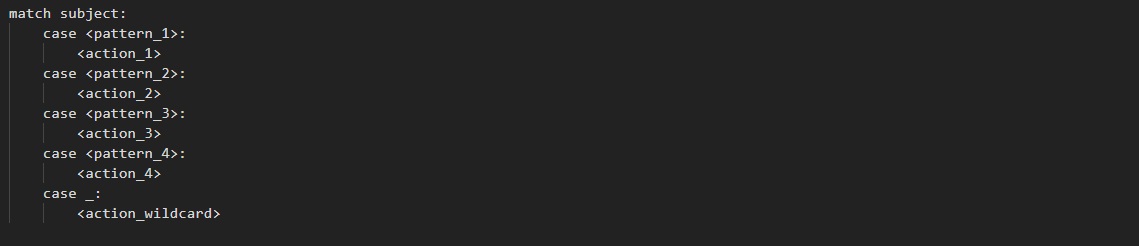
match subject:
    case pattern1:
        # runs if subject matches pattern1
    case pattern2:
        # runs if subject matches pattern2
    case _:
        # runs if nothing else matched (wildcard)
Python checks the cases from top to bottom and runs only the first one that matches. There is no “fall-through”, so you do not need break.
1. Literal Patterns: a Simple Menu
def drink(choice):
    match choice:
        case 1:
            return "You selected milk. Here is your milk!"
        case 2:
            return "You selected tea. Here is your tea!"
        case 3:
            return "You selected coffee. Here is your coffee!"
        case _:
            return "Sorry, only milk, tea and coffee are available."

print(drink(1))
print(drink(5))
Output:
You selected milk. Here is your milk!
Sorry, only milk, tea and coffee are available.
The underscore _ is the wildcard. It matches anything, so it works like default in other languages.
2. OR Patterns with |
def status(code):
    match code:
        case 200:
            return "OK"
        case 301 | 302:
            return "Redirect"
        case 400 | 401 | 403 | 404:
            return "Client error"
        case 500:
            return "Server error"
        case _:
            return "Unknown status"

for c in (302, 404, 999):
    print(c, status(c))
Output:
302 Redirect
404 Client error
999 Unknown status
3. Guards: Adding an if Condition
A guard is an if written after the pattern. The case runs only if the pattern matches and the condition is true. Here an ATM accepts only multiples of 500:
def withdraw(amount):
    match amount:
        case int() if amount > 0 and amount % 500 == 0:
            return f"Processing withdrawal of Rs {amount}"
        case int() if amount > 0:
            return "Invalid amount. Only multiples of 500 are allowed."
        case _:
            return "Please enter a positive whole number."

for a in (1000, 120, -500):
    print(withdraw(a))
Output:
Processing withdrawal of Rs 1000
Invalid amount. Only multiples of 500 are allowed.
Please enter a positive whole number.
int() here is a class pattern: it matches any integer.
4. Sequence Patterns: Matching the Shape of a List
This is where match goes beyond a switch statement. It can check how many items a list has and capture them into variables:
def command(text):
    match text.split():
        case ["quit"]:
            return "Goodbye!"
        case ["go", direction]:
            return f"You walk {direction}."
        case ["pick", "up", item]:
            return f"You picked up the {item}."
        case ["drop", *items]:
            return f"You dropped: {', '.join(items)}"
        case _:
            return "I don't understand."

for t in ("go north", "pick up sword", "drop key coin map", "quit", "dance"):
    print(command(t))
Output:
You walk north.
You picked up the sword.
You dropped: key, coin, map
Goodbye!
I don't understand.
direction and item are capture patterns: they match any single value and store it. *items collects all remaining values into a list.
5. Mapping Patterns: Matching Dictionaries
Very useful for JSON data from an API:
def area(shape):
    match shape:
        case {"type": "circle", "radius": r}:
            return round(3.14159 * r * r, 2)
        case {"type": "rectangle", "width": w, "height": h}:
            return w * h
        case _:
            return None

print(area({"type": "circle", "radius": 3}))
print(area({"type": "rectangle", "width": 4, "height": 5, "color": "red"}))
print(area({"type": "triangle"}))
Output:
28.27
20
None
A mapping pattern only checks the keys you mention. Extra keys, like "color", are ignored.
6. Class Patterns: Matching Objects
from dataclasses import dataclass

@dataclass
class Point:
    x: int
    y: int

def where(p):
    match p:
        case Point(x=0, y=0):
            return "Origin"
        case Point(x=0, y=y):
            return f"On the Y-axis at y={y}"
        case Point(x=x, y=0):
            return f"On the X-axis at x={x}"
        case Point(x=x, y=y):
            return f"Somewhere else: ({x}, {y})"

for p in (Point(0, 0), Point(0, 5), Point(3, 0), Point(2, 7)):
    print(where(p))
Output:
Origin
On the Y-axis at y=5
On the X-axis at x=3
Somewhere else: (2, 7)
The Most Common Mistake: Using a Variable Name as a Constant
RED = "red"

match colour:
    case RED:          # does NOT compare with "red"!
        ...
    case "blue":
        ...
A bare name in a case is a capture pattern. It matches everything and stores the value in RED. Python spots this and refuses to run the code:
SyntaxError: name capture 'RED' makes remaining patterns unreachableUse a literal (case "red":) or a dotted name such as an Enum member (case Colour.RED:) instead.
match-case vs if-elif
- For two or three simple comparisons,
if-elifis perfectly fine. - Use
matchwhen you are checking the structure of data (lists, dictionaries, objects) or have many alternatives. It is shorter and easier to read.
Frequently Asked Questions
Does Python have a switch statement?
Not by that name, but since Python 3.10, match-case does everything a switch does and much more.
What does case _ mean?
It is the wildcard pattern. It matches anything and is used as the default case.
Do I need break in match-case?
No. Only the first matching case runs; there is no fall-through.
Related: Python list sort() · Basic Python syntax